The Clio browser extension that files any download link
Upload files to your Clio matters from any website. Right-click a download link, select your matter, done. No downloads folder, no manual uploads.

- ✓Google Chrome on desktop — Windows, macOS, or Linux
- ✓An active Clio Manage account (US, Canada, UK & Europe, or Australia) you can sign into
- ✓About 30 seconds to install from the Chrome Web Store and connect through Clio's official OAuth
Which one you reach for depends on where the file lives
They're not competitors — they solve different halves of the document problem. Plenty of firms run both.
Clio Drive
Clio's official desktop app. It mounts your matter documents like a network drive, so you can open, edit, and save files in Word, Excel, or Finder and have the changes sync back to Clio. It also moves local files the other way — its bulk file upload feature and Pending Upload Queue push documents from your computer into Clio in the background.
Reach for it when
You're working with local files — drafting and editing documents in place, or bulk-uploading files that already sit on your computer into Clio.
Send to Case
A browser extension. It grabs files that live out on the web — court portals, evidence sites, Gmail attachments, e-signature emails — and sends them straight into a matter without downloading them first.
Reach for it when
You're getting files in from a website into the right matter, in one right-click.
Short version: Clio Drive works with files on your computer — editing what's in Clio and bulk-uploading local documents into it; Send to Case captures files that live out on the web, without downloading them first.
What this Clio extension does
A browser-based alternative to the download-upload workflow.
Right-click any link
See a document you need? Right-click the download link and send it straight to Clio. Works anywhere a site shows its documents as links — court portals, email, insurance sites.
Batch page scanning
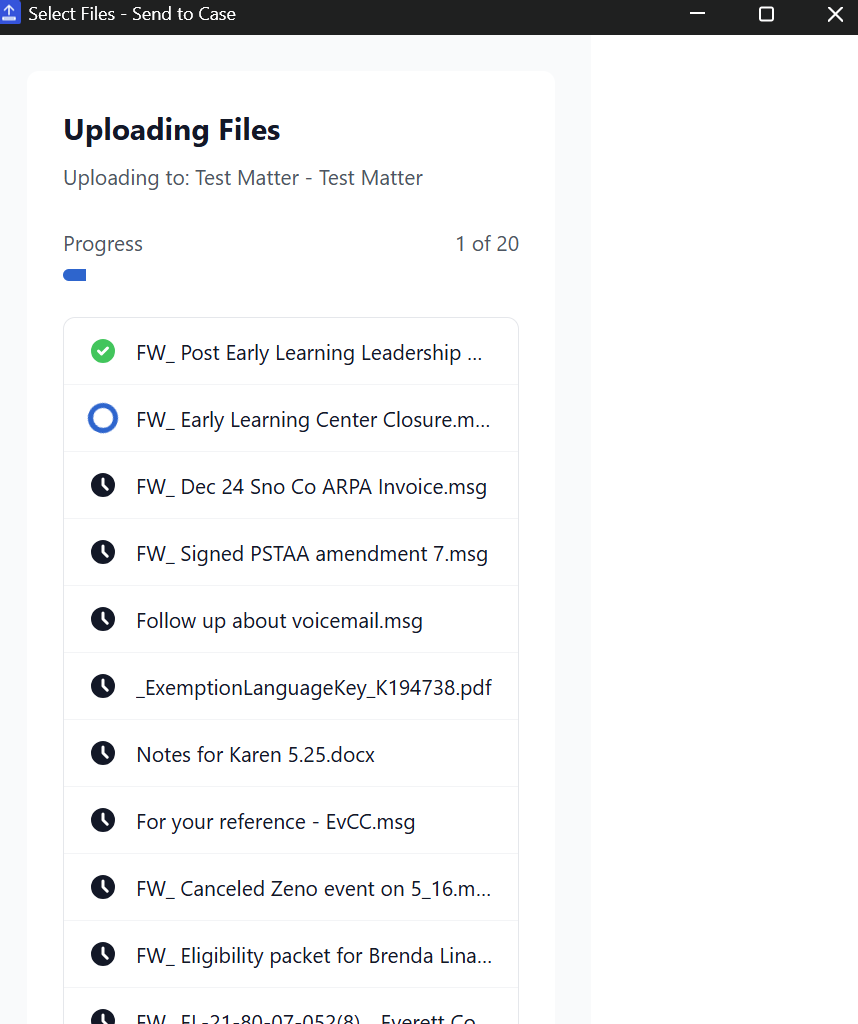
Need multiple files from one page? Scan the page to find its downloadable documents, select the ones you want, and upload them all at once. Some portals hide documents from scanners — for those, download the file and upload it from the extension popup.
Automatic zip extraction
Upload a zip file and Send to Case extracts the contents automatically. Each file goes to your matter individually, ready to use.
Drag, drop or paste
Already have files on your computer? Drag them into the extension popup and upload directly to Clio without navigating to Clio first. Screenshots go in the same way: copy one and press Ctrl+V (Cmd+V on a Mac) in the popup.
Folder selection
Choose exactly where files go. Browse your matter's folder structure or set a default folder for repeat uploads to the same location.
Quick matter search
Find your matter instantly with fuzzy search. Start typing the client or matter name and your recent matters appear first.
Tasks and calendar entries
When a batch upload finishes, create one Clio task that lists the documents you just filed, or add a calendar entry for the matter. Nothing is created unless you click.
Open it in Clio
After a batch upload, "Open in Clio" takes you to the matter's documents, and each file, including files from a zip, has its own "View in Clio" link. Batch uploads in History keep the same links.
Resume a zip
If some files from a zip link didn't reach Clio, resume it from the batch upload window: only the missing files upload, into the same folder, and nothing already in Clio is uploaded twice.
How to install in under two minutes
Get set up and uploading documents in under two minutes.
Visit Web Store
Go to the Chrome Web Store and find Send to Case.
Add to Chrome
Click "Add to Chrome" and confirm the installation.
Pin extension
Click the puzzle icon and pin for easy access.
Connect Clio
Sign in with your Clio account using secure OAuth.
Start uploading
Right-click any link and select "Send to Clio".
Built for security-conscious firms
Your client data deserves protection. Here's how we keep it safe.
Direct upload
Files travel straight from your browser to Clio. They never touch our servers.
Official OAuth
We use Clio's official authentication. Your password is never visible to us.
Local storage
Your matter list stays in your browser. A few settings sync through your browser account, never to our servers.
Privacy first
File names are replaced with codes in error reports, and your files never reach us.
Where legal professionals use this extension
Real scenarios where Send to Case saves time every day.
Court portals
Upload filings from PACER, CM/ECF, and state court systems directly to your matters.
Insurance portals
Save claim documents, medical records, and policy files from carrier websites.
Gmail attachments
Right-click an attachment in a Gmail thread to send it to a matter, with a suggested filename from the sender, subject, and date.
Evidence sites
Download photos and documents from evidence sharing portals and body cam footage sites.
Government agencies
Save records from FOIA responses, agency portals, and public records databases.
E-signature platforms
Upload signed documents from DocuSign, PandaDoc, or any e-signature notification email.
Common questions about the Send to Case browser extension
Got more? Email [email protected].
Is there an official Clio Chrome extension?
+Clio offers Clio Drive for desktop file sync. Send to Case is a third-party Chrome extension that provides a different workflow - instead of syncing folders, it lets you right-click any download link to upload directly to Clio without downloading first.
What can I do with the Send to Case Chrome extension?
+Send to Case lets you upload files to Clio matters from anywhere: right-click download links, drag and drop files, scan pages for downloadable documents, and extract zip files automatically. All without leaving your browser tab.
Is the Clio browser extension free?
+Send to Case offers a free tier with 10 uploads per month. Pro is $19/month or $190/year (two months free). No credit card required to start.
Does the Chrome extension work with all Clio accounts?
+Yes, Send to Case works with Clio Manage accounts in the United States, Canada, the UK and Europe, and Australia. Clio runs each region separately, so the first time you sign in, from the Send to Case icon in your toolbar or from the upload window, it asks where your Clio account is and remembers your answer. You'll need an active Clio subscription. It connects through Clio's official OAuth API.
Is my data secure with this Clio extension?
+Yes. Files upload directly from your browser to Clio's servers - we never see your documents. We use Clio's official OAuth for authentication, so we never see your password. Your matter list stays in your browser. We do keep some records, such as your account details, pseudonymous usage records and security logs, and our error tracker receives scrubbed error reports; our privacy policy lists everything.
Is there a file-size limit when uploading to Clio?
+Clio caps a single file at 5 GB, the same whether you upload through the web Documents area or the Clio Drive desktop app. A file larger than 5 GB has to be split or stored externally and linked from the matter - no upload method raises the ceiling, and zipping only helps when the contents compress. Send to Case streams files straight to Clio, but it can't lift Clio's own per-file limit.
Prices in US dollars
Keep going
Clio bulk upload
Batch page scanning, drag-and-drop, and automatic zip extraction — for evidence portals and discovery.
Read guide →Clio upload troubleshooting
Fixes for failed uploads, login issues, and "Something Went Wrong" errors.
Read guide →Migrating to Clio
Three paths to close the document gap, a 12-week timeline, and a pre-migration cleanup checklist.
Read guide →Clio document management
Organizing matter documents once they're in Clio — the complete guide.
Read guide →Ready to try the Clio Chrome extension?
Install Send to Case and start uploading documents to Clio in seconds.
10 free uploads/month. No credit card required. Prefer to start from the Clio side? Find us in the App Directory.