Upload PACER documents to Clio without downloading
Stop downloading federal court filings to your desktop just to re-upload them to Clio. Send documents from PACER and CM/ECF directly to your matters with a single right-click.

The PACER-to-Clio problem
Federal litigation means constant trips to PACER. Every document follows the same tedious path.
You receive an NEF email about a new filing. Here's what happens next:
Right-click the document link in PACER and select "Send to Clio":
Streamline your NEF email workflow
When a Notice of Electronic Filing (NEF) lands in your inbox, counsel of record get a one-time free look at that filing in their own case. That free look is your chance to save it to Clio before PACER's per-page charges apply on later views.
With Send to Case, click the NEF link to open the document in PACER, then right-click and send it directly to Clio. No need to download it first, and no need to go back to PACER later to retrieve it again.
- ✓ Click the NEF link to view the document
- ✓ Right-click and send to your Clio matter
- ✓ Avoid paying again to re-download later
Avoid unnecessary PACER re-downloads
PACER charges per page every time you access a document. If you don't save a filing the first time you view it, you'll pay again to access it later. Attorneys who handle dozens of federal cases can accumulate significant PACER fees from repeat downloads alone.
Send to Case helps you capture documents on first access. By sending filings to Clio immediately, you build a complete case file without needing to return to PACER for documents you've already paid to view.
Send to Case does not reduce PACER's per-page access fees. It helps you avoid the cost of re-downloading documents you've already accessed.
Works with both legacy and NextGen CM/ECF
The federal judiciary has been transitioning courts to the NextGen CM/ECF platform. Send to Case works with both versions.
Legacy CM/ECF
Courts still running the original CM/ECF system work seamlessly. Right-click document links in the docket view and send them to Clio.
- ✓ Docket sheet document links
- ✓ Case query results
NextGen CM/ECF
The updated NextGen platform uses a modernized interface, but documents still have download links that work with Send to Case.
- ✓ Updated docket interface links
- ✓ Single sign-on compatible
- ✓ Cross-court search results
Send to Case works with any website that has downloadable document links. It doesn't require special integration with PACER or CM/ECF — it simply intercepts the download and sends the file directly to Clio instead. This means it works regardless of which CM/ECF version your court uses. The same right-click workflow extends beyond the federal system — the court documents to Clio guide covers state and local portals as well.
Batch upload an entire PACER docket
When you're catching up on a case or onboarding a new matter, you often need to download dozens of filings at once. Instead of downloading each one individually, use Send to Case's batch scan feature. One caveat on cost: the NEF free look covers only the single filing in that notice, so batch-pulling a whole docket accesses each document fresh and incurs PACER's per-page fee on every one — worth weighing before you grab an entire case file.
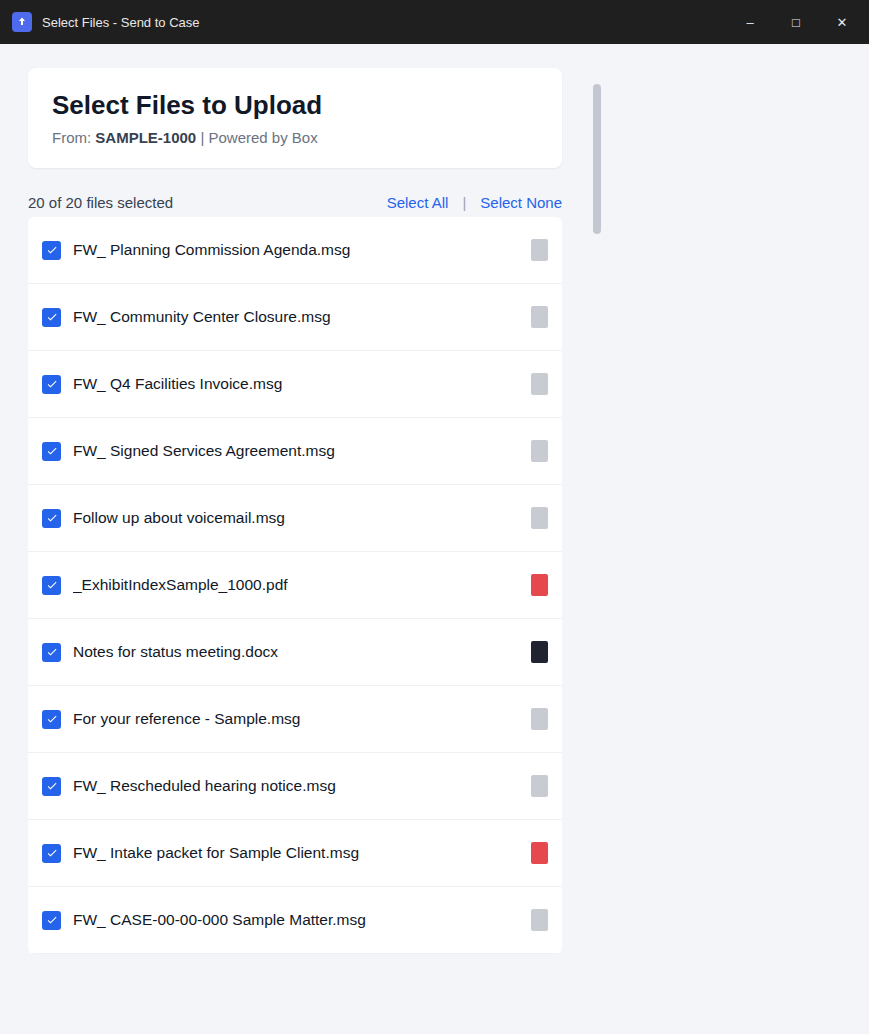
- ✓ Opens the docket page in PACER and scans for all document links
- ✓ Select the filings you need, deselect the ones you don't
- ✓ All selected documents upload to the same Clio matter and folder
Batch upload in action
Built for security-conscious firms
Your client data deserves protection. Here's how we keep it safe.
Direct upload
Files travel straight from your browser to Clio. They never touch our servers.
Official OAuth
We use Clio's official authentication. Your password is never visible to us.
Local storage
Your matter list stays in your browser. A few settings sync through your browser account, never to our servers.
Privacy first
File names are replaced with codes in error reports, and your files never reach us.
Every federal court, one workflow
PACER is the public access portal for the federal judiciary's CM/ECF system. Send to Case works with every court in the system.
U.S. District Courts
Upload filings from any of the 94 federal district courts across all 50 states and territories. Civil case filings, criminal case documents, motions and briefs, court orders and opinions.
Bankruptcy Courts
Handle the high volume of bankruptcy filings efficiently. Send schedules, plans, and orders to Clio instantly. Petitions and schedules, plans of reorganization, proofs of claim, discharge orders.
Circuit Courts of Appeals
Appellate filings from all 13 circuit courts, accessible through the same PACER system. Appellate briefs, appendices and records, published opinions, mandate documents.
Common questions about uploading federal court documents to Clio
Got more? Email [email protected].
Does Send to Case work with all federal courts?
+Yes, Send to Case works with all 94 federal district courts, all bankruptcy courts, and all circuit courts of appeals. Any document you can access through PACER or CM/ECF can be sent directly to your Clio matter.
Do I still need a PACER account?
+Yes, you still need your own PACER account to access federal court documents. Send to Case handles the upload to Clio — it does not provide access to PACER or bypass any authentication requirements.
Does it work with NextGen CM/ECF?
+Yes, Send to Case works with both the legacy CM/ECF system and the NextGen CM/ECF platform. Simply right-click any document link in either system and select "Send to Clio."
Can I upload documents from NEF email links?
+Yes. When you receive a Notice of Electronic Filing (NEF) email, click the document link to open it in PACER, then right-click the document and select "Send to Clio" to upload it directly to your matter.
Will Send to Case reduce my PACER costs?
+Send to Case won't reduce PACER's per-page access fees, but it can help you avoid re-downloading documents you've already accessed. By sending documents directly to Clio on first access, you won't need to go back to PACER to retrieve them again later.
Keep going
Court documents to Clio
Overview of uploading court filings — federal, state, and tribal — straight into matter folders.
Read guide →Tyler Odyssey & File & Serve
State-court filings from Tyler Technologies' Odyssey portal and File & Serve.
Read guide →State court documents to Clio
Coverage notes for state-court eFiling portals — NYSCEF, eFileTexas, MyFLCourtAccess, and more.
Read guide →Stop the PACER download-upload cycle
Join federal litigators who send PACER documents straight to Clio.
Free tier includes 10 uploads/month. See pricing